

Sharing guides
Itra gives you two ways to share a guide: send a .itra file, or upload the complete guide to your Itra console and send someone a link.
Sharing a .itra file
Section titled “Sharing a .itra file”A .itra bundle contains steps, selectors, instructions, narration and the paths of page variables the guide watches. It deliberately contains no screenshots and no captured watched page variables. It is only a few KB, and the file does not contain those captured page values or what was on your screen.
Exporting a bundle
Section titled “Exporting a bundle”Pick the Live .itra guide format on the export screen - Export in the editor, or Export/Share on a Library row. Send the file over Slack, email, a drive - it’s tiny.
Importing
Section titled “Importing”In the Library, Import .itra and pick the file. The imported guide appears with placeholder thumbnails.
Imported guides are untrusted first
Section titled “Imported guides are untrusted first”A guide you did not record replays in your browser, with your logins - so before its first replay, Itra shows you every step, every site it will open and every watched-variable path it will read, then asks you to trust it. Itra reads none of those paths before you trust the guide.
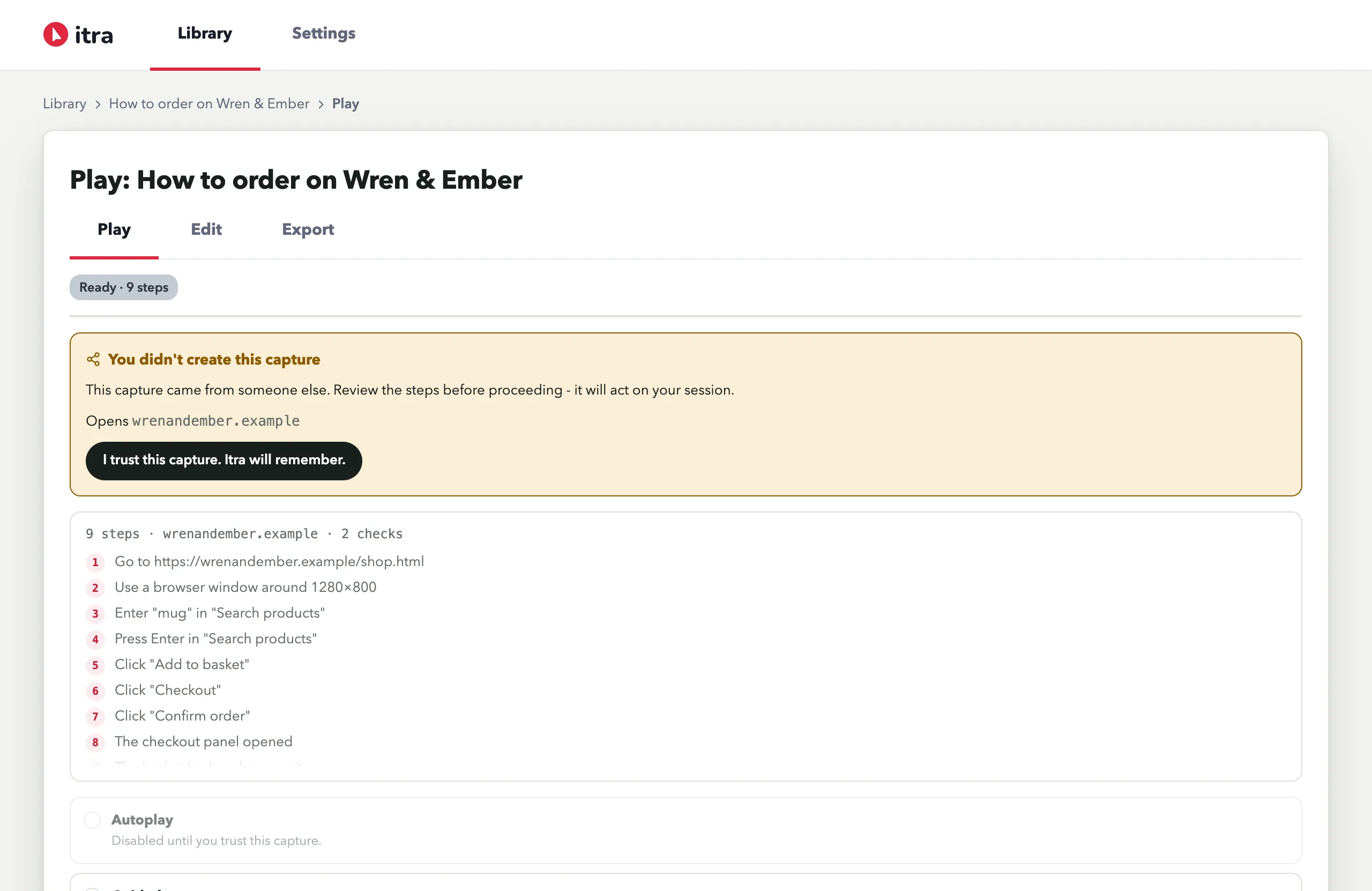 If the file contains JavaScript or console checks, they are shown in that review but are not supported in this version - replay skips them and says so.
First replay fills in the screenshots
Section titled “First replay fills in the screenshots”Open the imported guide and hit Replay - the Refresh screenshots as it runs toggle is on by default when shots are missing, so the replay captures fresh screenshots from the recipient’s own browser, with their data and their permissions. Watched page variables are regenerated from that browser during the replay too. After one replay the guide looks fully native.
Two things this file design buys:
- Privacy - the
.itrafile carries none of your screenshots; recipients see screenshots captured in their own browser. It also carries none of your captured watched values; recipients generate their own changes during replay. - Freshness - the same toggle re-captures screenshots on your own guides whenever the UI has drifted since recording.
Sharing from your Itra console
Section titled “Sharing from your Itra console”On a Library row, press Upload to console, then confirm in the dialog that opens. This sends its screenshots and transcribed narration to your own Itra console. It sends the watched-variable paths so the guide can be replayed, but never the watched page variables captured in your browser.
Open the guide in your console, choose Share guide, and set General access to Anyone with the link. Anyone with the link can open the hosted copy without signing in.
The guide has one permanent public address. Setting General access to Only you stops the link from opening the guide within 60 seconds, but it cannot recall a copy someone has already downloaded. Setting access back to Anyone with the link reactivates the same address.